|
|
|
|
|
|||
|
|
||||||||||
|
Home > Learn > Why Is Exposure So Important? > Incident Light Meters Simplify Your Life With An
Analog Incident Light Meter It will be helpful in you read Using Reflected Light Meters,
In a lot of photographic situations an incident light meter is faster and simpler to use, and more accurate than a reflected light meter. This article will compare the two and tell you how to use an incident light meter.
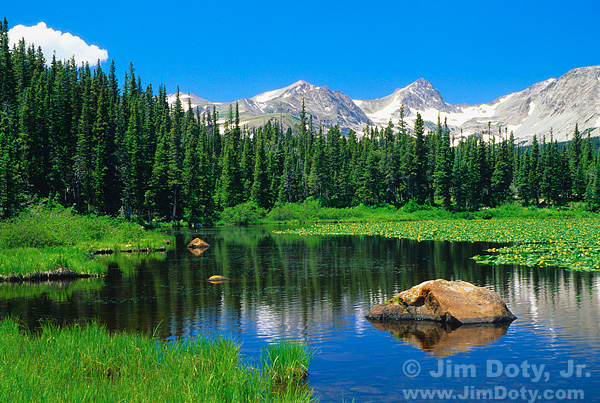
Reflected and Incident Light Meters There are two primary kinds of photographic light meters. Reflected light meters (like the one in your camera) measure the intensity of the light that is reflected off the subject. For that reason, you usually point a reflected light meter at the subject. Incident light meters measure the intensity of the light that is falling on ("incident to") the subject. Therefore, you usually point the white dome of an incident light meter at the light source. Your Incident Light Meter is "Blind" An incident light meters can't "see" your subject. It is, so far as the subject is concerned, totally blind. It could could care less what your subject looks like, or how light or dark it is. And that's what gives it an advantage in so many exposure situations. Just like a sound meter that measures the intensity of the sound but can't tell if the sound is coming from a symphony or a freight train, an incident light meter measures the intensity of the light but it doesn't know if the light source is a light bulb, flashlight, candle, campfire, or moonlight. It just measures the intensity of the light without "seeing" the light. It is like standing out in the rain with your eyes shut and your arms spread wide. You can tell if it is a very light drizzle, a sprinkle, a gentle rain, a heavy down pour, or a total deluge from the sky. You can be a rain meter without seeing the rain. Why Use an Incident Light Meter? In many situations, using an incident light meter is quicker and simpler to use than using a reflected light meter. And it is usually more accurate. A comparison will help illustrate the difference. To get the best exposure with a reflected light meter, you must vary from what the light meter says for every subject that is lighter or darker than a medium tone. If there are a lot of tonalities in a scene, ranging from very light to very dark, you have to find one that is medium toned to use as the basis for your metering (see this article), or your exposure will be off. Take this photo for example.
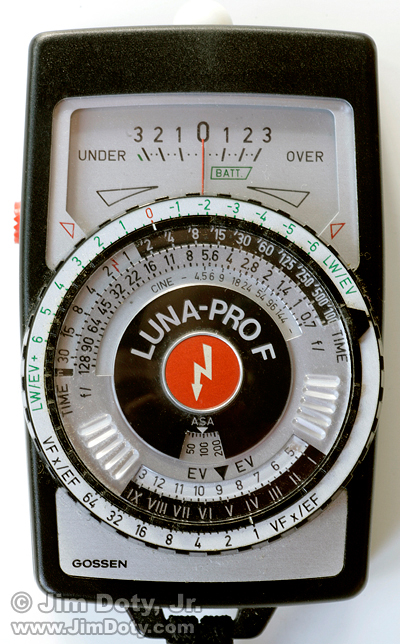
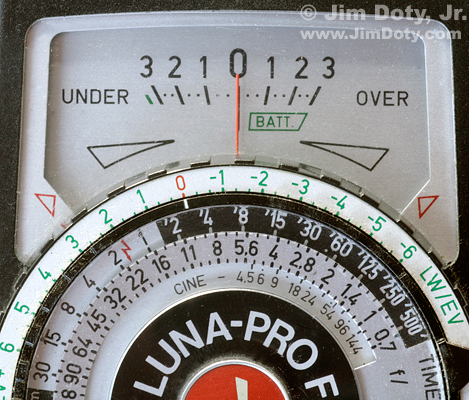
Red Rock Lake, Indian Peaks Wilderness, Colorado Fiddling with Your Camera's Reflected Light Meter There is a wide range of tones in this mountain scene from the white puffy cloud and white snow on the peaks to the dark tones of the green evergreens and the even darker evergreen reflections in the water. If you point the reflected light meter in your camera at the whole scene, it will be fooled by the darker tones in the middle of the photograph and overexpose the picture. The next choice is to find a medium tone in the scene that you can meter. As this article explains, green grass and blue sky aren't always a reliable "medium tone" to meter. The best medium tone in this picture is the gray surface of the peaks in the middle (excluding the snow), but the gray area might be too small to meter accurately with your wide angle lens. So you take off your 24mm wide angle lens that you are going to use to create this image and you put on your 70 -200mm or longer telephoto zoom lens. You zoom out to the longest focal length and meter the gray rock face on the central peaks, and make note of the exposure. Then you meter the white cloud and snow on the peaks to make sure they aren't more than two stops lighter than the gray peaks or they will end up looking washed out in the photo. Once you have made your exposure determination, you take off the 70-200mm lens, put your 24mm wide angle lens back on your camera, and take the picture. Metering the Same Scene with an Incident Light Meter If the above process seems a bit time consuming, there is a much faster and simpler alternative. Take your incident light meter and set the ISO on the meter to match the ISO on the camera, point the white dome at the light source (the sun) and push the button to get a meter reading. Set your camera's aperture and shutter speed to the exposure reading the incident light meter gives you and take the picture. Simple. Easy to do. Fast. Accurate. I just timed the whole process and it took all of about 15 seconds to get out the incident meter, take a reading, and set the resulting aperture and shutter speed on the camera. Since an incident light meter measures the intensity of the light that is falling on the subject, it isn't fooled by subject tonality like a reflected light meter. In the scene above, there are about a dozen different tonalities from the lightest to the darkest. If you spot metered each one with a reflected meter, you would get twelve different meter readings, but which one is right? Most of them would make your photo too light or too dark, so you need to find just the right tone to meter. With an incident light meter, you don't need to go through all of that rigamarole with most subjects. In many situations you can't beat an incident light meter for accuracy. With a reflected light meter have to make a judgment call as to which tone is closest to a true medium tone and how much exposure compensation you need to use for the best exposure. With an incident light meter you don't have to make that judgment call since it is dead on accurate at measuring the intensity of the light, uninfluenced by the tones in the subject. Analog vs Digital Incident Light Meters "Analog" and "digital" refers to how the meter works, not to digital or film cameras. You can use either kind of incident light meter and it doesn't matter if you are using a film or digital camera. Analog vs Incident Light Meter The photo at the top of this article shows an older style analog incident light meter. You set the "ASA" dial below the red lighting bolt to the ISO setting on your digital camera (or the ISO of the film you are using). (The ASA system is the old name for the ISO system. The numbering system is the same.) Then you point the small white dome (on top of the meter) at the light source and push the red button on the left side of the meter. Then you center the red needle on the zero at the top exposure compensation scale, It is marked from 3 stops "UNDER" to 3 stops "OVER" with a zero in the middle (see the next photo). Once you have "zeroed the needle", you can see all of the aperture and shutter speed combinations that will give you the same exposure. If you want to add or subtract light from the recommended meter reading (more about that later), just put the red needle wherever you want on the exposure compensation scale. Here's a closeup of the needle scale and dials.
Incident Light Meter (Analog) Scale and Dials The red needle is "zeroed" on the exposure compensation scale. The black dots on the scale indicate 1/3 stop increments. The "TIME" dial indicates the shutter speeds and the "f/" dial indicates the f-stops. You can instantly see all of the aperture and shutter speed combinations that will give you the same exposure from 30 seconds at f/90 on the far left to 1/500 seconds at f/0.7 on the far right. Most camera lenses won't have all of those f-stops. My 50mm lens has a range of f-stops from f/1.4 to f/22, so my options on the above scale range from 2 seconds at f/22 to 1/125 second at f/1.4. In this low light situation the shutter speeds don't line up exactly with the 1/3 stop tick marks for apertures, but they are within 1/6 of a stop which is plenty close enough. Modern cameras don't allow you to set apertures and shutter speeds in 1/6 stop increments so the meter gives you a reading that is more accurate than your camera can reproduce. This particular analog meter also works as a flash meter which is a big plus for using camera mounted flash units in manual mode or studio flash units which are manual only. I picked up this meter to do manual flash work for portraits and weddings and soon fell in love with the simplicity of incident light metering for landscapes and other work. If you slide the white dome to the side, uncovering the metering cell, you can use this meter as a reflected light meter and point it at the subject, but you can't see the exact area it is metering. It is much more accurate to use the reflected light meter in your camera. The time to use this meter as a reflected light meter would be the very rare occasion when the reflected light meter in your camera dies but the camera keeps working. That has only happened to me once. I happen to like the old school analog meters with the dials that show you all the exposure combinations at once, and you can still find these old meters on the used market for about $75 to $150 dollars. If you go looking for one of these analog meters, be sure you get a good working model from a reputable dealer with a good used warranty and a reasonable return period. Digital Incident Light Meter
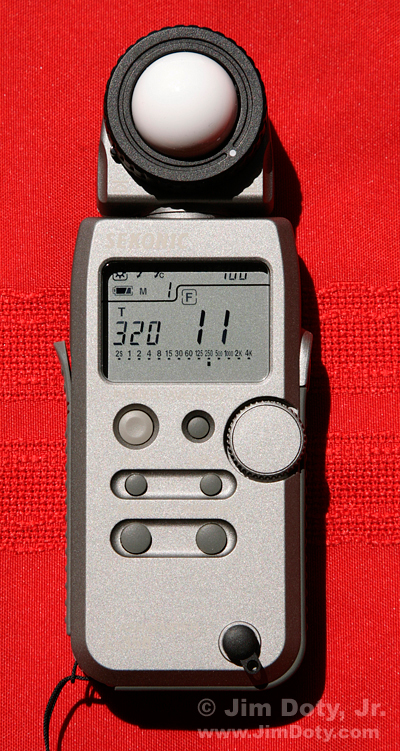
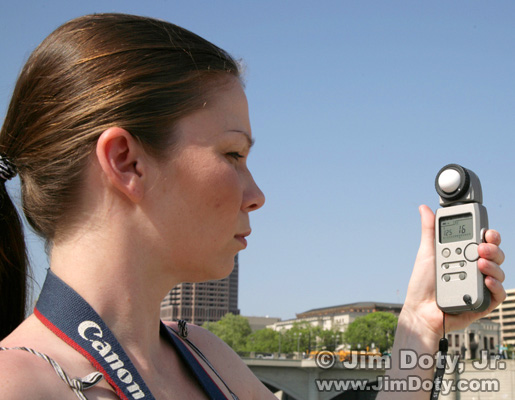
Digital Incident Light Meter This is a digital incident light meter. This electronic wonder measures incident light and, like the analog meter up above, it is also a flash meter. Digital incident light meters are more rugged than analog meters, and they meter to 1/10 of a stop as opposed to 1/3 of a stop. As much as I love my analog meter, it is more delicate, and since they are getting harder to come by I don't want to drop it off some mountainside some day. So I finally decided to buy a digital incident light meter, and after a lot of research, I decided on the Sekonic L-358. Using the push buttons on the front of the meter, you set the ISO to match the ISO on your camera, point the white dome at the light source and push the button on the side of the meter. The face of the meter displays one aperture and shutter speed combination that will give you the right exposure (not quite so cool as the analog meter which shows you all combinations at once). To see all the other aperture and shutter speed combinations, simply spin the round dial on the front of the meter and the meter will cycle through all of the other combinations. This meter happens to be displaying a combination of 1/320 second at f/11 with an ISO of 100 in very bright sunlight. Transfer the f-stop and shutter speed combination to your camera and you are ready to go. This photographer is pointing the white dome of the meter at the sun before taking a photo of a sunlit subject.
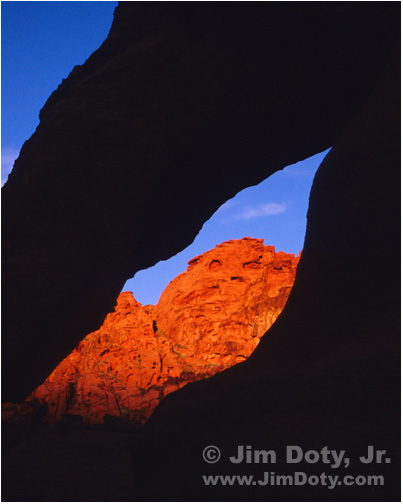
Photographer using an incident light meter. Is an incident light meter like going to metering heaven? Yes, much of the time. But there are a few catches. The meter must be in the same light as the subject To use an incident light meter, the white dome of the meter must be in the same light as the light falling on the subject. If your subject is in the sunlight and your meter is in the shade, you won't get an accurate meter reading for your sunlit subject (even if you prefer being in the cool shade). If you are standing in the sunlight on one mountain and you are photographing another sunlit mountain, your meter will do just fine. If a passing cloud puts you in the shade, your incident light meter won't give you an accurate meter reading. You have to use a reflected light meter, or wait for the cloud to pass until you are in the sun again. As long as the light on the subject and the light on your meter are the same, you are good to go. I was climbing around in some rocks when I found this "window" so I set up my
camera to shoot through the window at the sunlit rocks. I was in the shade so in order to use my incident light meter, I had to climb down from my perch, run
around the shaded rock to get in the sunlight, point the white dome at the sun and meter, and run back around and climb up the rock, set my camera to the meter reading, and take the picture.
"The Window", Valley of Fire State Park, Nevada Meter and subject distance, outside and indoors Outside where the light can be pretty even, you don't have to be close to your subject. Sunlight on one mountain is going to be the same as sunlight on the mountain a mile away. If you are on top of one mountain photographing the other one, even though you are a mile from your subject, you and your subject are essentially the same distance from the sun.
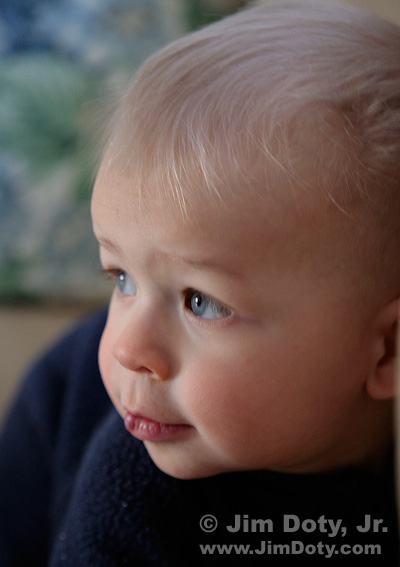
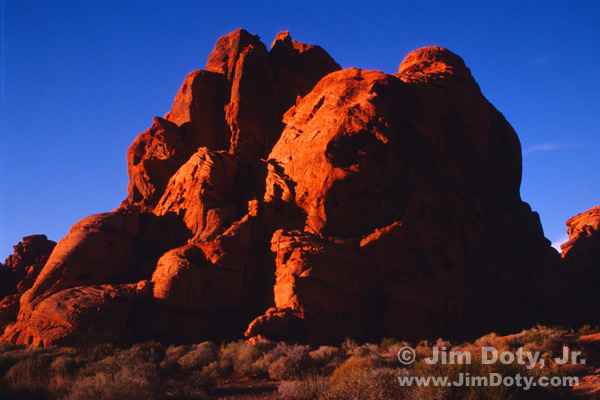
Window Light Portrait Indoors, that all changes. Light falls off with the square of the distance (indoors or out). That means if the distance to the light source doubles, you lose two stops of light. Outside, that's usually not a problem when the light sources is the sun, the moon, or a cloudy sky, and the light is the same everywhere. But indoors it is another story. If you are taking a picture by window light and your subject is 6 feet from the window and you hold the incident meter 3 feet from the window (half the distance to the window), your subject will be 2 stops underexposed. Indoors, it is important to put the incident light meter right in front of your subject and point the white dome at the light source. In the photo above, the incident light meter needed to be right in front of the boy's face with the white dome pointed at the window. It doesn't matter if the light source is a light bulb, studio light, or a window. Keep the meter next to your subject when you point it at the light source. Where do you point the white dome? Where you point the dome depends on which side of your subject you want to be normally exposed. For me, that usually means I point the white dome at the primary (brightest) light source. In the following photo, I pointed the white dome to the left at the setting sun so the side of the boulders facing the sun would be properly exposed. That meant the side of the boulders away from the sun would go very dark.
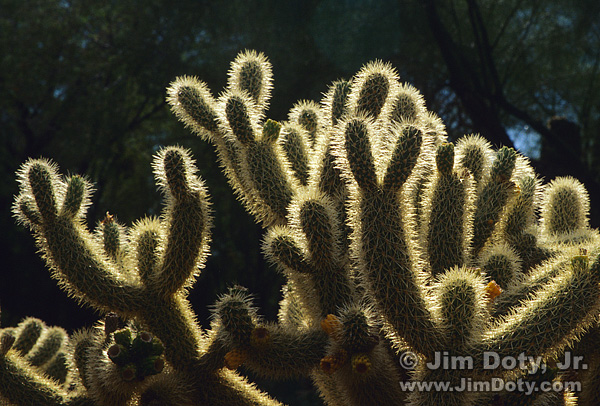
House Sized Boulders at Sunset, Valley of Fire State Park, Nevada Had I pointed the white dome of the meter to the right, away from the sun, the shaded side of the boulders would be normally exposed and the sunny side would be seriously overexposed. If I stood near the rocks and pointed the white dome at my camera (splitting the difference between the other two exposure possibilities), the sunlit side would have be overexposed and the shaded side underexposed. It's your choice where to point the white dome. Just don't fall for the advice that you should "always point the white dome at the camera". That won't always give you the exposure you want. This is just my preference, but in the sunlight with frontlit and sidelit subjects, I usually point the dome at the sun. In sunlight with backlit subjects, I point the white dome at the camera (away from the sun) and subtract 1 stop of light from what the meter says. That's because backlit subjects usually look best somewhat underexposed. Or I point the white dome at the sun (away from the camera) and then add 2 stops of light to what the meter tells me. This overexposes the back (sunlit) side of the subject and underexposes the side of the subject toward the camera. That will give you a photo something like this backlit cactus. The sunlit side of the cactus is technically overexposed and the side toward the camera is underexposed, which is exactly the look I wanted.
Backlit Cactus When you have a subject with a sharply defined edge, backlit by the sun when it's not high in the sky, and a dark background behind your subject, you have the possibility of very nice rim light (as in the photo above). It doesn't happen often in nature so make the most of it when it does.
Exposure Compensation with an Incident Light Meter The good news is you don't have to use exposure compensation nearly as much with an incident light meter as you do with a reflected light meter. The bad news is you DO need to use exposure compensation with very light and very dark subjects. Light toned subjects, medium toned subjects and dark toned subjects will all look good without any exposure compensation. Just point the white dome at the primary light source, push the button, and use the aperture and shutter speed the meter recommends. It's still as simple as that. With white subjects, like bright sunlight on snow, you can end up with burned out highlights. This is especially true with slide film, and it is also true of many digital cameras. It's not the fault of the incident meter. The problem is that slide film and digital sensors can't capture the whole range of light that the eye can see. The same is true of black or very dark subjects, they will be too dark or go black, again because of the limited capture range of film and digital sensors. Here's what you need to do. With white or very light subjects, subtract from 1/2 to 1 stop of light from what the incident meter tells you. You will need to experiment to see which works best for you and the camera you are using. With black or very dark subjects, add about 1 stop of light to what the incident meter tells you. Again, you will need to experiment to see which works best for you. Please note that with incident light meters, exposure compensation is in exactly the opposite direction from exposure compensation with reflected light meters. With reflected light meters (because they try to make everything medium toned), you add light for light subjects (remember the phrase, "add light to make light") and subtract light for dark subjects. With incident light meters you subtract light to keep white and very light subjects from washing out, and you add light to keep dark subjects from disappearing in murky darkness. Light Robbing Accessories Your incident light meter doesn't know if you are using light robbing accessories.
Polarizing filters, other "dark" filters, teleconverters, and extension tubes all reduce the light coming through the lens. If you are using light robbing
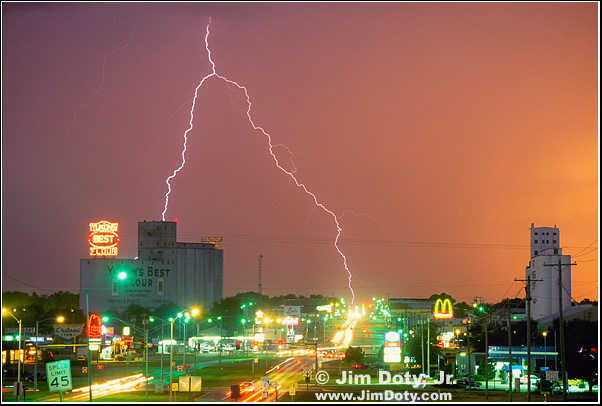
accessories, you need to allow for that when using an incident light meter. When Should You Not Use an Incident Light Meter? 1. As mentioned above, don't use an incident light meter when you can't get it in the same light that is falling on the subject. 2. Don't use an incident light meter when the light source IS the subject. When you are photographing Christmas lights, fireworks, lightning, streets lights, sunsets, or other light sources, an incident light meter will let you down. If you point an incident light meter at the light source that is your subject, it will give you a good meter reading for something which the light is shining on (behind you ), but not the light that is your subject. When your subject is the light, like this photo that combines lightning with the last light of sunset, use a reflected light meter to do the job.
Lightning, Yukon Oklahoma Alternatives There are less expensive alternatives to using an incident light meter with many of the same advantages. One alternative is to turn your camera into an incident light meter with an ExpoDisc. An 18% gray card is another even less expensive alternative. Locations Red Rock Lake is not far from Ward Colorado, northwest of Boulder. It is near the road to Brainard Lake at the entrance to the Indian Peaks Wilderness. Don't miss Long Lake or Brainard Lake. The whole area is a great place to take pictures. Valley of Fire State Park is a wondrous place at sunset. It is about an hour north of Las Vegas. Yukon Oklahoma is on old U.S. 66 and a few miles west of Oklahoma City.
Speaking Your Camera's Exposure Language: Aperture, Shutter Speed, and ISO Using Reflected Light Meters, Part One Using Reflected Light Meters, Part Two Simplify Your Life with an Incident Light Meter Turn Your Camera Meter Into An Incident Light Meter: Using an ExpoDisc Using a Gray Card, Incident Light Metering on the Cheap The RAW versus Jpeg Exposure Advantage
More Information The most detailed information about using incident light meters, gray cards, and camera meters is in my book, Digital Photography Exposure for Dummies.
The Sekonic L-358 is a great digital incident light meter that will also serve as a first class flash meter. You can order the Sekonic L-358 at Amazon.com. You can also look at several other highly recommended light meters at my photography store which is powered by Amazon.com and has Amazon's excellent prices, first rate service, and guarantee.
December 23, 2010 |
|
|
|
|
|
Copyright © Jim Doty, Jr. All rights reserved. |
|
|
|
||||||||||||||||||||||||